
A gaming keyboard’s spec sheet is full of numbers that sound important and mostly aren’t — 1000Hz polling rates, N-key rollover, RGB zone counts. The things that actually decide whether you keep using a keyboard after the first month are quieter: switch feel, how the keycaps are made, and whether the layout fits your desk.
SaveItMore is reader-supported. If you buy through a link on this page we may earn a commission, at no extra cost to you.
This guide breaks down what each spec actually changes, how to pick a switch type without testing a dozen keyboards in person, and what to check before you buy.
Switch Type: The Single Biggest Decision
Everything else on a gaming keyboard is a variation on a theme. The switch is the thing that decides how it feels to type and game on, every single keystroke.
Mechanical Switches
A physical switch under every key, using a metal spring and contact mechanism. They come in three broad families: linear (smooth, no bump, favored for fast, repeated inputs like shooters), tactile (a small bump partway down that you feel but don’t hear, a middle ground for typing and gaming), and clicky (a bump plus an audible click, satisfying to type on and the loudest option by a wide margin — worth avoiding if you share a room or stream with open mic audio).
Optical Switches
Instead of a physical metal contact, an optical switch uses a beam of light that the keypress interrupts. The main advantage is speed and longevity — no physical contact means less wear and, on some models, a faster actuation point. The feel can be tuned to mimic linear or tactile mechanical switches, so the switch family matters more to feel than whether it’s optical or mechanical underneath.
Membrane and Hybrid
Cheaper keyboards use a rubber dome membrane under the whole key matrix rather than individual switches. They’re quieter and cheaper but mushier, with no consistent actuation point. Fine for casual use; most dedicated gaming keyboards have moved away from pure membrane designs.
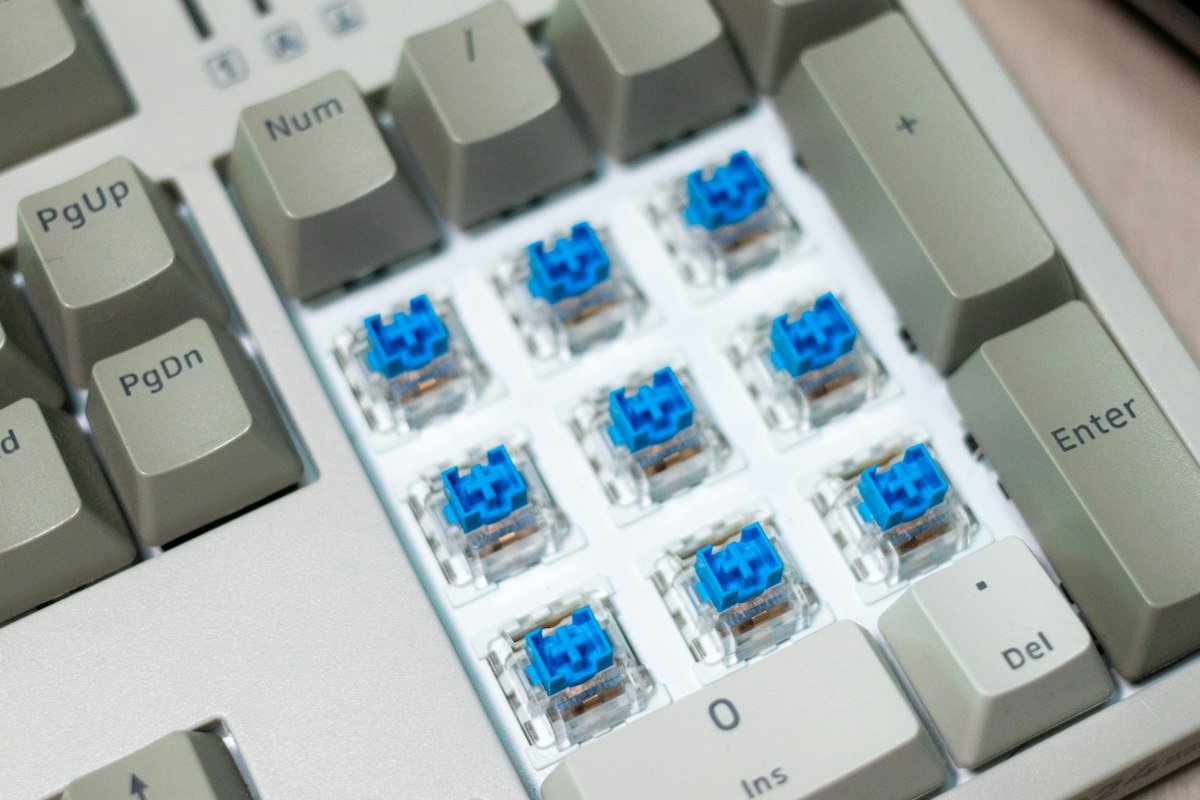
Hot-Swappable Sockets: Try Before You Commit to One Switch
A growing number of gaming keyboards let you pull switches out with a small tool and swap in a different type, no soldering required. This matters more than it sounds: if you’re not sure whether you prefer linear or tactile, a hot-swap board lets you buy one keyboard and test several switch types in it over time, rather than buying a second keyboard to find out.
Layout Size: What You Give Up at Each Step Down
- Full-size (100%). Includes the number pad. Takes the most desk space, which matters if you also need room for low, wide mouse swipes.
- Tenkeyless (TKL, ~87%). Drops the number pad. The most common competitive-gaming size, since it frees up space on the mouse side without losing any other keys.
- 75% and 65%. Compresses the arrow keys and function row closer to the main block, and drops some navigation keys. Saves more desk space, at the cost of a learning curve if you rely on dedicated Home/End/Page Up keys.
- 60%. Drops the function row and arrow keys entirely, accessed through a secondary function layer instead. Smallest footprint, biggest adjustment.
If you’re setting up a desk from scratch, a smaller board also changes how far you need to reach for your mouse — worth deciding alongside the rest of the setup rather than after the fact.
Keycaps: The Part You Actually Touch
Stock keycaps on budget boards are usually thin ABS plastic, which feels slick and develops a shine on the most-used keys within months. PBT plastic is the common upgrade: thicker, more textured, and resistant to that shine. Keycap profile (the shape and height of the cap) also affects feel more than most buyers expect — a sculpted profile that doesn’t match your typing angle can feel awkward even on an otherwise great switch.
What to Check Before You Buy
- Switch type over brand name. Two keyboards from different brands using the same switch family will feel more alike than two keyboards from the same brand using different switches.
- Wired vs wireless latency. As with mice, a 2.4GHz wireless connection is close enough to wired for the vast majority of players; Bluetooth is the slower option and better suited to everyday typing than competitive play.
- N-key rollover and anti-ghosting. Matters if you ever hit several keys at once in a game (common in shooters and fighting games) — a budget board can drop or misread simultaneous presses.
- Software reliability. Remapping, macros and per-key lighting usually live in a companion app. Check recent reviews for complaints about buggy software before buying into an ecosystem.
- Cable and build quality, if wired. A braided, detachable cable survives desk moves far better than a thin, permanently attached one.
Common Mistakes When Buying a Gaming Keyboard
- Buying clicky switches for a shared space. They’re loud enough to bother roommates, co-workers on a call, or anyone near an open mic.
- Going full-size without checking desk space. A number pad you don’t use just pushes your mouse further from a natural position.
- Ignoring hot-swap when unsure about switch feel. It costs little extra and removes most of the guesswork.
- Chasing polling rate numbers. Beyond a reasonably low bar, polling rate stops being the differentiator marketing makes it look like — similar to DPI on a gaming mouse.
Where to Find a Gaming Keyboard and Current Discounts
SteelSeries makes gaming keyboards alongside its mice and headsets, with a hot-swap option in several of its current boards. It’s worth checking SaveItMore’s current SteelSeries coupon codes before you order, since an active code can take a real chunk off the price. If you’re putting together the rest of a gaming desk at the same time, our gaming mouse buying guide and gaming headset buying guide cover the same fit-first approach for the other two peripherals, and our new PC setup checklist is worth a read if the keyboard is part of a bigger new-PC order.
Frequently Asked Questions
Are optical switches better than mechanical switches?
Not definitively better, just different in how the keypress is detected. Optical switches tend to last longer and can actuate slightly faster, but the switch family (linear, tactile or clicky) matters more to how it feels than whether it’s optical or mechanical underneath.
What switch type is best for gaming?
Linear switches are the most common competitive-gaming choice because there’s no bump interrupting fast, repeated presses. Tactile suits players who also type a lot on the same board, and clicky is best avoided in shared or mic-sensitive spaces.
Is a tenkeyless keyboard better than full-size for gaming?
For most gaming setups, yes — it frees up desk space on the mouse side without losing any keys you’d use in a game, since the number pad is rarely needed mid-match.
Do I need a hot-swappable keyboard?
Not essential, but genuinely useful if you’re unsure which switch type you prefer. It lets you try several switch feels in one keyboard instead of buying multiple boards to find out.
Does keyboard software slow down my PC?
Some companion apps run a persistent background process; check recent reviews for complaints about resource usage before buying into a brand’s ecosystem, especially on an older PC.
The Bottom Line
A gaming keyboard is worth judging by switch feel first and spec-sheet numbers second. Decide between linear, tactile and clicky based on where you’ll use it, consider a hot-swap board if you’re not certain, and pick a layout size that matches how much desk space your mouse actually needs.