Microsoft’s own price for a Windows licence and what people actually pay for one are two very different numbers. Somewhere between those two numbers is a line, and on the wrong side of it are keys that get deactivated, keys that cannot be transferred, and keys that were never Microsoft’s to sell.
This guide is about where that line sits, so you can find the cheapest way to buy Windows licence keys that keep working — paying well under retail without ending up with a machine that starts nagging about activation three months later.
SaveItMore is reader-supported. If you buy through a link on this page we may earn a commission, at no extra cost to you.
First: do you need to buy one at all?
Four situations where the answer is no, and people pay anyway.
- You are replacing a drive or upgrading Windows on the same PC. Since Windows 10, a licence activated once on a machine becomes a digital licence tied to that motherboard and stored on Microsoft’s servers. Reinstall on the same hardware and it reactivates on its own. Do not buy a second key for this.
- You are moving a retail licence to a new PC. A retail licence is transferable. Deactivate or simply stop using it on the old machine, then use the key on the new one. Link the licence to your Microsoft account first (Settings → Accounts) so the activation troubleshooter can move it for you.
- The PC came with Windows. An OEM key is embedded in the machine’s firmware. Wipe the drive, reinstall the same edition, and it activates itself with no key entered.
- You are a student, or your employer has a volume agreement. Many universities distribute Windows Education free through a portal, and employers frequently have a home-use programme. Ask before you spend anything.
There is also the option people forget: unactivated Windows is fully functional. You get a watermark and you cannot change the wallpaper and accent colour. Everything else — updates, security patches, all features — works. It is not a licence, and for a business machine it is not appropriate, but for a test machine or an old PC in the spare room it is a legitimate choice rather than a crippled one.
The four kinds of Windows licence
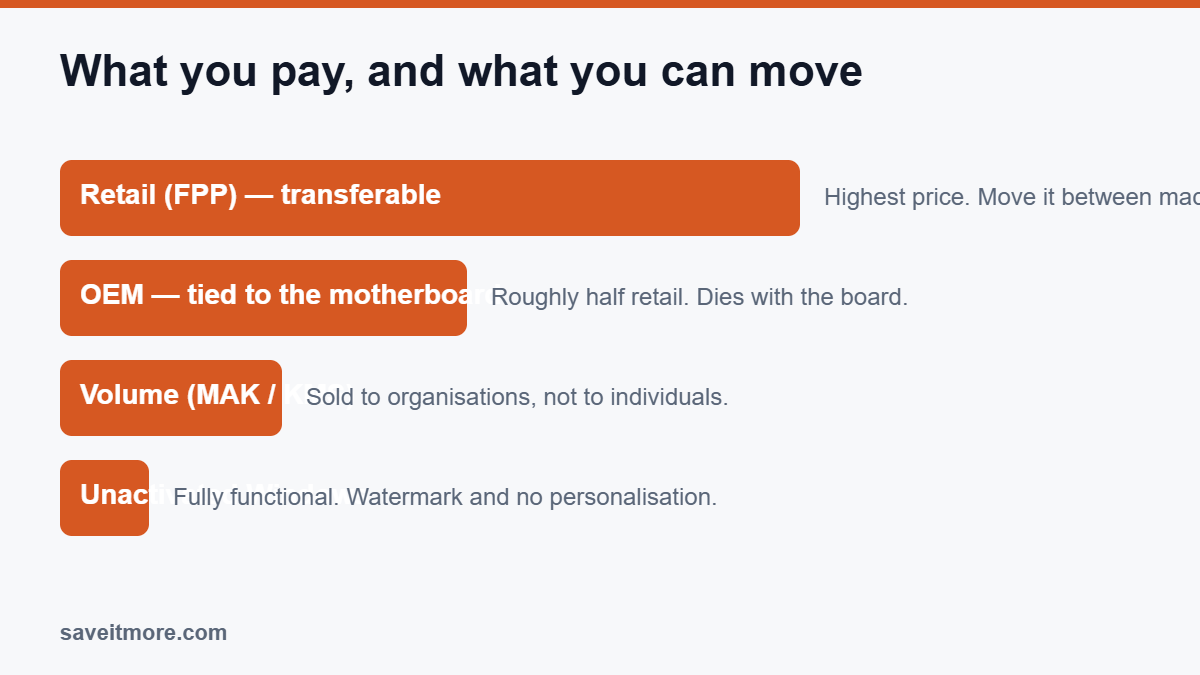
| Type | What it is | Transferable? | Typical price |
|---|---|---|---|
| Retail (FPP) | Bought as a boxed or download product from Microsoft or an authorised retailer | Yes — move it between machines, one at a time | Highest |
| OEM | Sold to system builders to be installed on a machine they sell; also available to self-builders | No — bound to the first motherboard it activates on | Roughly half retail |
| Volume (MAK/KMS) | Bulk licensing sold to organisations under an agreement | Governed by the organisation’s agreement | Low per seat, not sold to individuals |
| Digital licence | The activation entitlement Windows stores against your hardware and, if you link it, your Microsoft account | Follows the underlying licence type | Already paid for |
The important row is OEM. It is genuine, it is legitimately sold, it is around half the retail price, and its only real limitation is that it dies with the motherboard. If you are building or fixing one PC and do not plan to migrate the licence to a future machine, OEM is the sensible default and the biggest honest saving available.
The cheapest way to buy Windows licence keys — and where they come from
Now the part everyone actually wants explained: why some marketplaces list Windows Pro for less than a takeaway.
Keys at that price come from somewhere, and the honest list of sources is short:
- Regional pricing arbitrage. A key bought where software is cheaper, resold where it is expensive. Often technically genuine, frequently against the terms it was sold under, and the activation can be revoked if Microsoft acts on the batch.
- Volume licence keys split up and sold as singles. A MAK key issued to an organisation has a number of activations on it; someone sells them off individually. These activate perfectly on day one. If Microsoft blocks the underlying key, every machine that used it drops out of activation at once.
- Keys bought with stolen payment details. The chargeback later invalidates the key. You have no recourse.
- Genuine surplus and unsold OEM stock. This does exist and is where the legitimate discount resellers operate.
You cannot tell these apart by looking at the key. You can only judge by who is selling it and what happens if it fails, which is why the practical question is not “is this key genuine” but “who is standing behind it in six months”.
How to buy cheap without buying a problem
The safest cheap route: an established software reseller
Dedicated software resellers sit between Microsoft’s price and the marketplace free-for-all. They are more expensive than a $5 marketplace listing and much cheaper than retail, they invoice you as a business, and — the part that matters — they replace a key that stops activating. Check DirectDeals’ current licence offers before you buy.
DirectDeals is the one in our catalogue: a US reseller selling Windows, Office, Windows Server and CAL licences as instant digital downloads, with codes that regularly take another 15–20% off. Whoever you use, the questions are the same (see our is DirectDeals legit breakdown for more on DirectDeals specifically):
- Does the listing state clearly whether it is retail or OEM? Vagueness here is the warning sign.
- Is there a written replacement policy if the key fails to activate, and how long does it run?
- Is there a company address, a phone number, and a support channel that answers before you buy?
- Do they take a payment method with buyer protection?
The cheaper, riskier route: key marketplaces
Marketplaces like GAMIVO are not shops — they are platforms where independent sellers list keys, and the price you see is the lowest any of them will go. That is genuinely how the prices get so low, and it is also why the outcome varies by seller rather than by platform.
If you go this route, do it with your eyes open:
- Buy from a seller with a long history and a high rating, not the cheapest listing on the page. The two-dollar difference is not worth it.
- Take the buyer protection if the platform offers it as an add-on. On a cheap key it is a meaningful percentage but a small absolute amount, and it is the only thing that makes a revoked key recoverable.
- Activate immediately and check the activation status. Disputes are easy in the first days and impossible after months.
- Accept the risk you are taking. The key may work for years. It may also stop working, and if it does, on a marketplace purchase you are unlikely to get anything back once the window closes. Do not use this route for a machine a business depends on.
Marketplaces are genuinely good for game keys, where the publisher relationship is different and revocation is rare. For operating system licences, they are the cheap end of a spectrum with a real failure rate, and anyone telling you otherwise is selling something.
What to avoid completely
- “Lifetime Windows + Office bundle, $12, unlimited PCs.” No such product exists.
- Keys sold over social media or messaging apps, with no platform and no policy.
- Anything requiring you to download an “activator” or run a script. That is not a licence, and those tools are a standard delivery mechanism for malware. If a seller tells you to disable your antivirus, you already have your answer.
- Sellers who tell you to install their remote-access tool so they can “activate it for you”.
Activating it, and what to do when activation fails
Once you have a key, activation is usually instant: Settings → System → Activation → Change product key. When it does not work, the error code tells you which problem you have.
- “This key is already in use” (0xC004C060 and relatives). The key has been activated on more machines than it allows. On a reseller purchase this is what the replacement policy is for; on a marketplace purchase, open a dispute immediately.
- “Key is for a different edition.” A Home key will not activate Pro and vice versa. You can change edition in place, but you need the matching key.
- “We can’t activate Windows on this device” after a hardware change. Run the Activation Troubleshooter and choose “I changed hardware on this device recently”. This only works if the licence was linked to a Microsoft account beforehand — which is the two-minute job worth doing today rather than after the motherboard dies.
- Activation worked, then stopped weeks later. Typically a key that has been blocked at source. Nothing you do locally will fix it; go back to the seller.
One thing worth being clear about: an unactivated Windows install keeps receiving security updates. The nag and the personalisation lock are annoying, not dangerous, so you have time to sort out a licence properly rather than buying the first cheap key you find in a panic.
Upgrading Windows versions — do you need a new licence?
No, in the ordinary case. An eligible Windows 10 licence carries over to Windows 11 on the same machine; the upgrade path checks the hardware requirements, not your wallet. If the machine fails the requirements check, the answer is a hardware question, not a licensing one, and buying a Windows 11 key will not change it.
Moving between editions is different. Home to Pro is a paid upgrade, either through the Microsoft Store or by entering a Pro key — and buying a discounted Pro key from a reseller is usually cheaper than the in-Store upgrade price. Pro to Home is not something Microsoft supports; it needs a clean install.
Licensing a second PC, a laptop and a home lab
The rule is one licence per machine running Windows at a time, and there is no consumer multi-pack. A few practical notes:
- Virtual machines need their own licences. A Windows VM on your licensed PC is a second installation, and Microsoft treats it that way.
- Windows Pro includes Hyper-V, which is one of the genuine reasons to pay the Pro premium if you run VMs at home.
- Old machines can be re-used. If you retire a PC that had a retail licence, that licence can move to the replacement. An OEM one cannot.
- For a test machine, unactivated is a legitimate choice. It works, it updates, and it costs nothing — just do not run a business on it.
If you are building or rebuilding machines regularly, the cheapest way to buy Windows licence keys across several PCs is OEM licences from a reseller with a replacement policy, one per machine, rather than chasing the lowest marketplace listing each time.
Which edition do you need before you look for the cheapest way to buy Windows licence keys?
Home covers almost everyone. Pro costs meaningfully more and the practical differences come down to a short list: BitLocker drive encryption, joining a corporate domain, Remote Desktop host (connecting to the machine — connecting from it works on Home), Hyper-V, and Group Policy.
If none of those mean anything to you, buy Home and put the difference towards more RAM. If you need one of them, you need Pro, and paying twice — Home now and the upgrade later — costs more than buying Pro once.
Checking which Windows licence you already have
Microsoft’s own Windows support pages explain how activation is tied to your hardware and Microsoft account. To check what you currently have, open an administrator command prompt and run:
slmgr /dli — shows the licence description, partial key and activation status.
slmgr /xpr — tells you whether activation is permanent or expires on a date.
If /xpr reports an expiry date, you are on a volume or evaluation activation rather than a permanent licence — worth knowing if you bought from a marketplace and were told it was retail.
What about Office?
The same map applies, with one extra option: Office on the web and the free mobile apps cover a lot of real use for nothing. Beyond that, the choice is a Microsoft 365 subscription (always current, multiple devices, cloud storage) or a one-time Office Home & Business licence (cheaper over three years, no upgrades, one device). Perpetual Office licences are exactly what discount resellers like DirectDeals sell most of, and the standing 15% code there applies to them.
And if the reason you are buying Office is one PDF a month, do not — Wondershare PDFelement and similar tools cost a fraction of it, and LibreOffice costs nothing.
Buying for a business rather than a home PC
Everything above assumes one person licensing their own machine. If you are buying for a company, three things change.
Keep the paperwork. In a software audit, what matters is not that the key activated but that you can show a legitimate purchase — an invoice from a named company, with the licence type on it. This alone rules out marketplace keys for business use, whatever they cost.
Volume licensing may be cheaper than you think. Open Value and CSP agreements are not only for large enterprises; a reseller can quote surprisingly small quantities. Per seat, this often beats buying retail boxes, and it makes reinstalls and machine replacements much simpler to manage.
OEM licences move with the hardware, not the company. If your machines are on OEM licences, replacing a motherboard means buying a licence again. Factor that into the cost of ownership before treating OEM as the automatic budget choice for a fleet.
For a handful of machines, the cheapest way to buy Windows licence keys for a small business is usually OEM licences from an established reseller who invoices you properly and replaces a key that fails — the same route as for a home PC, just with the invoice filed rather than deleted.
Frequently asked
What is the cheapest way to buy Windows licence keys safely?
An OEM licence from an established software reseller. It is genuine, it costs around half the retail price, and the reseller replaces it if the key ever stops activating. The marketplace listings are cheaper still, but the replacement policy is what you are paying the difference for.
Is buying an OEM key as an individual allowed?
Microsoft sells OEM licences to system builders, and self-builders installing on their own machine have long been treated as within that category by the retailers who sell them. It is genuine software with a real restriction: it stays with the first motherboard. This is a summary rather than legal advice — if you are licensing machines for a business, read the terms attached to what you are buying.
Will a cheap key stop working?
Some do. Microsoft periodically blocks keys it identifies as improperly sold, and when that happens the machine reverts to unactivated — it does not stop working, it starts nagging. Your protection is the seller’s replacement policy, which is exactly what you are paying the extra for at a proper reseller.
Can I use one key on two PCs?
No. One licence, one machine at a time. A retail key can be moved; it cannot be in two places.
Does upgrading my CPU or motherboard break activation?
A motherboard swap breaks the hardware match. If the licence is retail and linked to your Microsoft account, the activation troubleshooter will move it — this is precisely why linking it is worth two minutes. If it is OEM, the licence stays with the old board.
The cheapest way to buy Windows licence keys: where the discounts are
These are the pages to check before you pay:
- DirectDeals coupon codes — Windows, Office, Windows Server and CALs, with standing percentage codes
- GAMIVO coupon codes — the marketplace route, best used for game keys and with buyer protection on
- Wondershare coupon codes — PDFelement, Filmora and the rest of the suite
- Abelssoft coupon codes — Windows maintenance utilities
- How to recover deleted files on Windows — every route in order, and the SSD trap
Setting up a new machine? Two things are worth doing before you install anything else: set up a backup that you have actually tested, and if you are moving from an old PC, read how to clone a hard drive to a new SSD rather than reinstalling everything by hand.