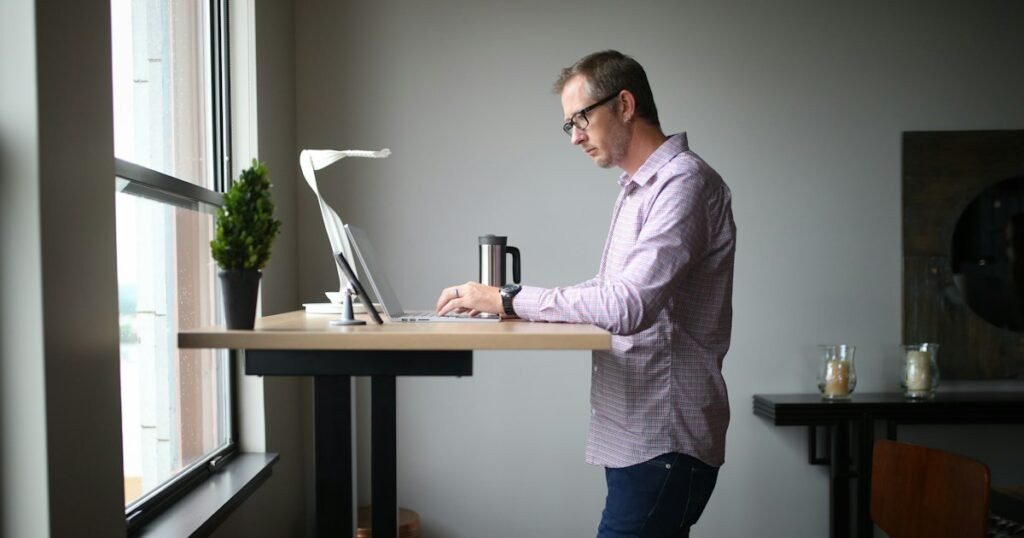
The right standing desk height is the one where your elbows bend at about 90 degrees while your shoulders stay relaxed and your wrists stay straight. Get that right and a standing desk feels natural. Get it wrong and you end up with sore shoulders, tight wrists and a desk you stop raising after the first week.
SaveItMore is reader-supported. If you buy through a link on this page we may earn a commission, at no extra cost to you.
This guide shows you how to find your ideal height in two minutes, gives you a height chart to start from, and covers the parts people forget: monitor position, footwear and how long to actually stand.
The short answer
Stand up straight in the shoes you normally wear at your desk. Let your arms hang loosely, then bend your elbows to 90 degrees with your forearms parallel to the floor. Measure from the floor to the underside of your forearm. That is your desk surface height, give or take an inch.
For most adults, the answer lands somewhere between about 36 and 44 inches (91 to 112 cm). Taller people sit at the top of that range, shorter people at the bottom.
How to find your ideal standing desk height
A chart is a good starting point for your standing desk height, but your arms and torso decide the real number. This method takes two minutes and works for any body.
- Put on your usual shoes. Trainers, heels and bare feet can shift the right height by an inch or more.
- Stand tall and relax your shoulders. Don’t shrug or pull them back artificially.
- Bend your elbows to 90 degrees, forearms level with the floor, upper arms close to your sides.
- Raise or lower the desk until the surface sits just under your forearms. Your hands should rest on the keyboard without lifting your shoulders or bending your wrists up.
- Type for a minute, then adjust. A small tweak of half an inch is normal.
If your desk has memory presets, save this standing desk height straight away. A preset removes the friction of re-adjusting every time you switch, which is the main reason people stop standing.
Standing desk height chart
Use this standing desk height chart to set a first position, then fine-tune using the elbow method above. Heights assume normal shoes and a keyboard placed directly on the desk.
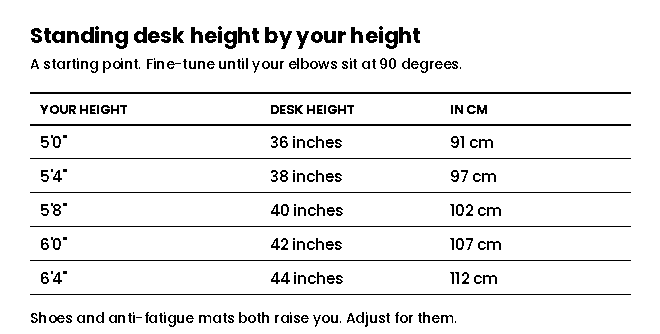
- 5’0″ (152 cm): about 36 inches (91 cm)
- 5’4″ (163 cm): about 38 inches (97 cm)
- 5’8″ (173 cm): about 40 inches (102 cm)
- 6’0″ (183 cm): about 42 inches (107 cm)
- 6’4″ (193 cm): about 44 inches (112 cm)
These are averages. Two people of the same height can have noticeably different arm and torso lengths, so trust your elbows over the chart when they disagree.
Monitor height matters as much as desk height
A perfect standing desk height with a badly placed screen still leaves you with neck ache. Long screen sessions can leave your eyes feeling dry too, and our guide to dry eye relief at home covers the simple steps that help — our is CorneaCare legit review looks at one brand that packages that routine for you. Once the desk is set, fix the monitor:
- The top third of the screen should sit at or slightly below eye level. You should look straight ahead or slightly down, never up.
- Keep the screen about an arm’s length away — roughly 20 to 30 inches for most monitors.
- Tilt it back slightly, 10 to 20 degrees, so the whole screen faces your eyes.
On a laptop, this is nearly impossible without help. If the keyboard is at the right height, the screen is far too low. A laptop stand plus a separate keyboard and mouse solves it and costs much less than the neck strain.
If you use a monitor arm, adjust the screen each time you switch between sitting and standing. On a desk with presets the desk moves the screen with it, so you only need to set it once for each position.
Standing desk height vs sitting height
A standing desk is also a sitting desk, and the same elbow rule applies. Sit with your feet flat on the floor, knees at roughly 90 degrees, and lower the desk until it sits just under your bent forearms. For most people that falls between about 25 and 30 inches (64 to 76 cm).
Adjust your chair first, then the desk. If your feet don’t reach the floor comfortably at the right chair height, a footrest fixes it.
How long should you stand?
Finding the right standing desk height is only half the job. Standing all day is not the goal. Swapping one static position for another just moves the problem from your lower back to your feet and legs. The benefit comes from changing position regularly.
A sensible starting point is about 20 minutes of standing in every hour, broken up rather than done in one block. Build up slowly over the first couple of weeks. Many people settle into a rhythm of switching every 30 to 45 minutes.
Useful habits that make it stick:
- Stand for calls and meetings. They have a natural start and end.
- Use a timer or the desk’s reminder feature if it has one.
- Shift your weight and move. Standing still like a statue is tiring; small movements aren’t.
- Stop when you feel fatigue, not after it becomes pain.
Five common standing desk height mistakes
Setting the desk too high. The most common error. If your shoulders creep up towards your ears while typing, lower the desk.
Bending the wrists upward. Wrists should be straight and level with your forearms. A desk that is too low forces them up; so does a keyboard with its back legs extended.
Forgetting footwear. Setting the height barefoot and then working in shoes throws everything off. Set it in the shoes you actually wear.
Standing on a hard floor without support. An anti-fatigue mat makes a real difference over a full working day, especially on concrete or tiles.
Leaving the monitor where it was. Every change in desk height needs a matching check on the screen.
What to look for in a standing desk
If you are buying one, check the standing desk height range against your own numbers before anything else. A desk that doesn’t go low enough for sitting or high enough for standing is no use to you, however well it is built.
- Height range that covers both your sitting and standing heights, with a little room to spare.
- Dual motors for smoother lifting and better stability, especially with two monitors.
- Memory presets, so switching position takes one button.
- Stability at full height — a desk that wobbles when you type gets left in the sitting position.
- Weight capacity that comfortably covers your monitors, computer and accessories.
If you are comparing electric standing desks and ergonomic chairs, our Autonomous coupon codes page lists the store’s current offers. Check what each code covers before using it — some apply only to specific models or bundles.
Setting up a better workspace generally? Our new PC setup checklist covers the software side in the right order, and our guides on how to clone a hard drive to an SSD and what size portable power station you need cover two other upgrades that are worth doing properly. If you also need storage furniture for the room itself, our look at whether GARVEE is a legit place to buy it is worth reading first, followed by our GARVEE furniture buying guide, which breaks down which categories are worth ordering room by room. Current GARVEE storage and office deals are listed on GARVEE’s offers page.
Frequently asked questions
What is the average standing desk height?
For an adult of average height, around 5’8″, the standing desk height is typically about 40 inches (102 cm). The full range for most adults runs from about 36 to 44 inches.
Should my elbows be at 90 degrees at the right standing desk height?
Yes, roughly. A 90 to 100 degree angle with relaxed shoulders and straight wrists is the target. Slightly more open than 90 degrees is fine and often more comfortable.
Is a standing desk height slightly too high or too low better?
Slightly low is usually easier to live with than too high, because a high desk makes you lift your shoulders. But the aim is neither — use the elbow method and adjust until it feels neutral.
How high should a standing desk be for someone 6 feet tall?
A standing desk height of around 42 inches (107 cm) is a good starting point for someone 6’0″. Fine-tune with your elbows at 90 degrees in your usual shoes.
Do I need an anti-fatigue mat?
Not strictly, but it helps a lot on hard floors and makes longer standing periods more comfortable. If you notice your feet or lower back aching, a mat is the first thing to try.
The bottom line
Your ideal standing desk height is wherever your elbows bend at about 90 degrees with relaxed shoulders and straight wrists — measured in the shoes you actually wear. Use the chart to get close, then let your elbows decide.
Set the top third of your screen at eye level, save the height as a preset, and alternate between sitting and standing rather than standing all day. That combination is what makes a standing desk worth having.
Ergonomic guidance in this article follows the principles set out in the Haworth ergonomic desk height guide. If you have an existing back, neck or joint problem, get advice from a physiotherapist or occupational health specialist on your setup.