



Buying a gaming headset is mostly an exercise in ignoring the spec sheet. Driver size, “7.1 surround” and frequency ranges down to 10 Hz sell units and tell you almost nothing about how the thing sounds on your head or how you sound to your team.
These are the seven things that actually decide whether you keep using it after a month.
1. Connection type, and the latency that comes with it
This is the first fork in the road. Wired has no meaningful latency and never runs out of battery. A 2.4GHz dongle is the wireless option built for gaming. Bluetooth is convenient and the slowest of the three.
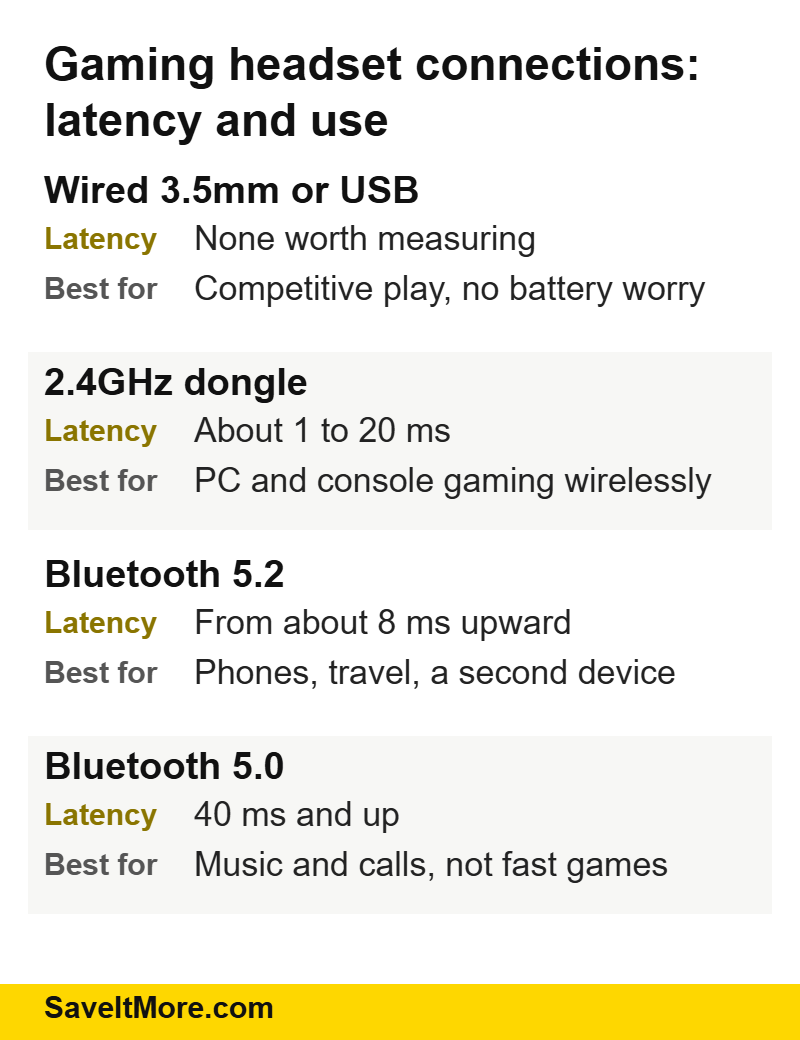
The gap is not imaginary. Corsair’s own comparison of 2.4GHz against Bluetooth puts low-latency 2.4GHz at around 1 ms and Bluetooth 5.0 at 40 ms or more, with 2.4GHz also holding range better. Forty milliseconds is enough to hear a footstep after you needed it.
The practical answer for most people: a headset with a 2.4GHz dongle and Bluetooth, so the dongle handles the game and Bluetooth handles the phone.
2. The microphone, which is what other people judge
You never hear your own mic; everyone else does. Look for a detachable or flip-to-mute boom rather than a tiny in-line mic, and check whether there is a sidetone setting so you can hear your own voice and stop shouting.
If you stream or record, a dedicated USB microphone will still beat any headset boom. For team chat, a good boom is enough.
3. Clamp force and weight, not “premium materials”
Comfort failures are the number one reason a gaming headset ends up in a drawer. Two numbers matter: weight, where anything under about 350 g is comfortable for long sessions, and clamp force, which no brand publishes.
If you wear glasses, look for memory foam or fabric pads with a channel for the arms. Leatherette isolates better and gets hot; fabric breathes and lets more noise in.
4. Surround sound is software, not hardware
“7.1 surround” on a two-driver headset means a virtual surround algorithm. It can genuinely help with directional cues in shooters, and it can also smear the soundstage in ways that make music and films sound hollow.
Treat it as a free extra you can switch on, never as a reason to pay more. Judge the headset on how it sounds in stereo.
5. Battery life you can plan around
Quoted battery figures are measured at moderate volume with lighting off. If the headset has RGB, assume the real figure is well below the number on the box.
The feature that matters more than raw hours is charging while you play over USB-C, and a hot-swap battery if you game for long stretches.
6. Platform compatibility, checked properly
PlayStation, Xbox and PC do not treat wireless the same way. Xbox needs either a licensed wireless protocol or a wired connection; PlayStation works with most 2.4GHz dongles; the Switch works over USB-C or Bluetooth depending on the model.
If you own two consoles, check the exact model number supports both before ordering. Brands sell near-identical headsets in platform-specific versions.
7. Software you will actually install
EQ presets, mic monitoring and firmware updates usually live in a desktop app. Some are light; some install background services you never asked for. If you are setting up a machine from scratch, our new PC setup checklist covers the order to install this kind of software so you do not end up with three audio drivers fighting each other.
What to skip
- Driver size. A 50 mm driver is not automatically better than a 40 mm one. Tuning matters more.
- Frequency response numbers. Human hearing tops out around 20 kHz; the specs go far beyond that for marketing reasons.
- RGB. You cannot see it while wearing it. It costs battery.
- Noise cancelling on a gaming headset. Usually weaker than on travel headphones, and it eats battery.
How to pay less
Three reliable ways to cut the price of a gaming headset:
- Buy the previous flagship. When a brand launches a new Arctis or Cloud generation, the outgoing model drops hard and loses very little in real use.
- Look at open-box and blemished-box stock. These are new units in damaged packaging, sold at a discount with the normal warranty.
- Time it. Gaming peripherals see their deepest cuts in the late-November sales window and around big platform launches.
For current offers, SteelSeries deals on SaveItMore lists the brand’s running deals page and its blemished-box discounts, taken from the store’s own affiliate feed rather than a scraped list.
If you are building the rest of the setup at the same time, is Origin PC legit covers prebuilt machines, and standing desk height covers the part of a setup people get wrong most often.
Frequently asked questions
Is a wireless gaming headset good enough for competitive play?
On a 2.4GHz dongle, yes — the delay is around a millisecond. Over Bluetooth, no.
Do I need a headset with a DAC or amp?
Not for a gaming headset. Those matter for high-impedance studio headphones, not for the 32-ohm drivers in almost every gaming model.
How long should a gaming headset last?
Three to five years is typical. The parts that fail are the headband hinge, the cable at the jack, and the battery in wireless models — look for replaceable ear pads, because the pads always go first.
Are cheap gaming headsets worth it?
Under about $50 you are usually choosing between decent sound and a decent microphone. Decide which one matters more for how you play.
The short version
Pick a gaming headset by connection type first, microphone second and comfort third. Ignore driver size, frequency charts and surround branding. Then buy last year’s model, or a blemished-box unit, and keep the difference.